
Workflow ghi chú Second Brain với Obsidian + Git 2026: từ zero tới PKM mạnh
Second Brain (PKM - Personal Knowledge Management) là khái niệm lớn năm 2025-2026. Bài này hướng dẫn xây hệ thống PKM thực dụng với Obsidian miễn phí, kết hợp Git để sync cross-device, template daily note, plugin must-have.
- 1TLDR — Second Brain là gì và ai cần›
- 2Tại sao Obsidian (không phải Notion/Evernote)›
- 3Cấu trúc vault Obsidian theo PARA method›
- 4Plugin Obsidian must-have (8 plugin)›
- 5Setup Git sync cross-device miễn phí›
- 6Workflow daily note + weekly review›
- 7Zettelkasten method — kết nối idea thay vì folder›
- 8Troubleshooting thường gặp›
- 9Câu hỏi thường gặp›
- 10Nguồn tham khảo›
TLDR — Second Brain là gì và ai cần
Second Brain (PKM — Personal Knowledge Management) là hệ thống ghi chú có cấu trúc để lưu, tìm lại, và kết nối thông tin trong đời. Obsidian (free cá nhân) + Git (sync cross-device free) là combo phổ biến nhất 2026. Setup trong 2 giờ, thành hệ thống dùng được sau 1 tuần.
Second Brain phù hợp với: dev lưu tech note, nhà nghiên cứu/SV lưu tài liệu học, content creator lưu idea, PM/founder lưu context dự án, nhiều người học nhiều môn cùng lúc. Không phù hợp: chỉ cần todo đơn giản (dùng Todoist/Apple Reminders), chỉ cần share note nhanh (dùng Notion/Google Docs).
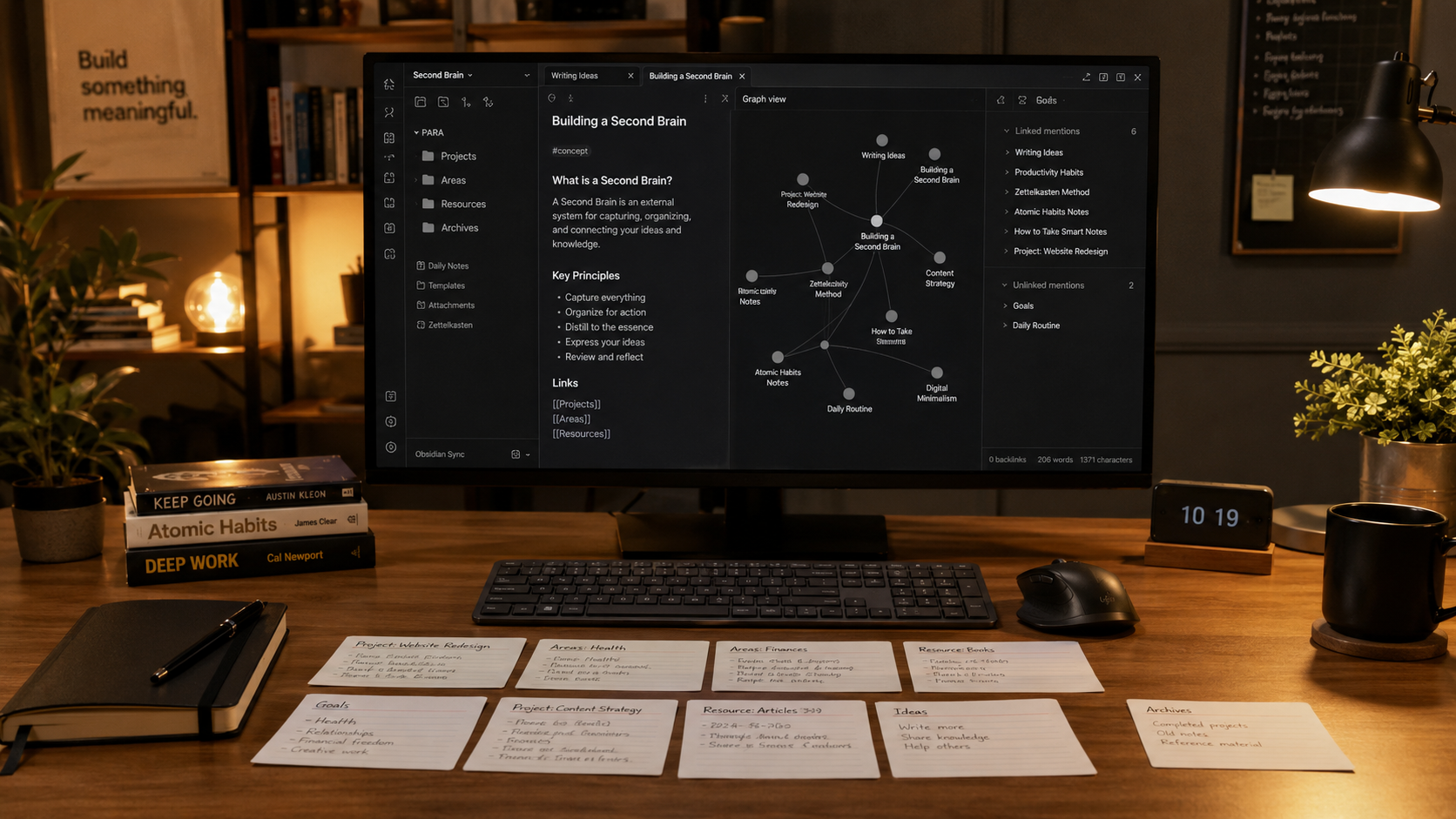
Tại sao Obsidian (không phải Notion/Evernote)
Obsidian là local-first, Markdown, plugin-rich. Khác với Notion/Evernote cloud-based proprietary, Obsidian lưu toàn bộ note là file .md plain text trong folder máy bạn. Lợi thế:
1. Own your data forever — file Markdown mở được với mọi editor 50 năm nữa, không phụ thuộc server công ty đóng cửa.
2. Miễn phí cho cá nhân — Notion free tier giới hạn block, Evernote free giới hạn device. Obsidian free unlimited.
3. Plugin ecosystem phong phú — 1,500+ community plugin free.
4. Sync linh hoạt — Obsidian Sync official $4/tháng, hoặc Git free, hoặc Syncthing/iCloud miễn phí.
5. Graph view visualize knowledge — thấy mạng lưới note kết nối với nhau, unique.
Notion tốt hơn khi cần: database relational, share với team, real-time collab. Chọn Notion nếu team > 2 người thường xuyên cùng document.
Evernote giờ không còn lý do dùng trừ khi migrate dần — đã bị đuổi bởi Obsidian + Notion trong comparison 2023-2026.
Apple Notes đủ cho ghi chú cá nhân đơn giản nhưng không có backlink, không Markdown, lock vào Apple ecosystem.
Cấu trúc vault Obsidian theo PARA method
PARA (Projects, Areas, Resources, Archives) là phương pháp tổ chức kho tri thức phổ biến nhất 2026, do Tiago Forte đề xuất trong sách "Building a Second Brain".
Cấu trúc folder đề xuất trong vault: ``` 📁 MyVault/ 📁 00-Inbox/ # note mới chưa phân loại 📁 01-Daily/ # daily note hằng ngày 📁 02-Projects/ # dự án đang active, có deadline 📁 Project-A/ 📁 Project-B/ 📁 03-Areas/ # lĩnh vực dài hạn 📁 Dev-Skills/ 📁 Health/ 📁 Finance/ 📁 04-Resources/ # kho reference, tài liệu học 📁 Books/ 📁 Articles/ 📁 Videos/ 📁 05-Archives/ # project done, lưu trữ 📁 99-Templates/ # template tái sử dụng 📁 assets/ # ảnh/file đính kèm ```
Nguyên tắc PARA: - Projects: có deadline và outcome cụ thể (ví dụ: "Hoàn thành đồ án TN 2026-06") - Areas: trách nhiệm/chủ đề dài hạn không deadline (ví dụ: "Học Rust", "Sức khỏe") - Resources: tài liệu sưu tầm để tham khảo khi cần - Archives: mọi thứ không active nữa
Đừng over-engineer ngay lúc đầu. Start với 4 folder 00-Inbox, 02-Projects, 03-Areas, 04-Resources. Archive khi cần. Evolve folder structure theo thực tế usage thay vì plan trước.
Plugin Obsidian must-have (8 plugin)
Tất cả plugin dưới đây đều free, cài qua Community Plugins trong Settings.
1. Templater — engine template mạnh hơn built-in. Tạo daily note template với date auto, task section, review section.
2. Dataview — query note như SQL. Ví dụ: LIST FROM "02-Projects" WHERE status = "active". Rất mạnh cho dashboard.
3. Calendar — sidebar calendar nhảy tới daily note theo ngày click. Đi kèm Periodic Notes plugin.
4. Periodic Notes — auto tạo daily/weekly/monthly/yearly note theo template.
5. Tag Wrangler — quản lý tag (rename, merge, split). Tag là hệ thống tổ chức thứ hai ngoài folder.
6. Excalidraw — vẽ mindmap, diagram, whiteboard trong note. Visual learner sẽ mê.
7. Advanced Tables — table editor UI thay cho gõ markdown table thủ công (vốn là pain point).
8. Git — sync vault qua Git push/pull. Xem phần dưới setup chi tiết.
Đừng cài quá nhiều plugin ngay đầu. Start với 3-4 plugin cốt lõi (Templater + Dataview + Calendar + Git), dùng 1 tháng rồi mới thêm. Nhiều plugin cùng lúc làm Obsidian chậm và bạn không dùng hết feature.
Setup Git sync cross-device miễn phí
Tại sao Git thay vì Obsidian Sync $4/tháng hay iCloud/Dropbox? - Miễn phí hoàn toàn - Version history mỗi commit — rollback note bị xóa nhầm - Sync cả trên Linux server, đồng nghiệp - Tool đã biết sẵn cho dev
Bước 1 — tạo repo GitHub private my-obsidian-vault tại github.com/new. Tick Private.
Bước 2 — trong folder vault (ví dụ ~/Documents/MyVault/):
```bash
cd ~/Documents/MyVault
git init
git remote add origin [email protected]:your-user/my-obsidian-vault.git
```
Tạo .gitignore vault:
```
.obsidian/workspace.json
.obsidian/workspace-mobile.json
.trash/
.DS_Store
```
Bước 3 — cài plugin Obsidian Git từ Community Plugins. Cấu hình:
- Commit message template: Vault backup: {{date}}
- Auto pull interval: 10 phút
- Auto commit-and-push interval: 15 phút
- Tick "Pull on startup" và "Push on shutdown"
Bước 4 — test sync: - Máy A: tạo note → Obsidian Git tự commit + push - Máy B: mở Obsidian → Git plugin tự pull → note xuất hiện - Conflict hiếm gặp nếu intervals hợp lý. Nếu có, plugin show notification → resolve thủ công
Bước 5 — Mobile sync: Obsidian mobile có plugin Git nhưng khó hơn do iOS restriction. Workaround: dùng Working Copy (iOS, free) làm Git client bridge, hoặc chỉ mobile read-only (sync thông qua iCloud Drive).
Nếu sync phức quá, dùng Obsidian Sync official $4/tháng — setup 1 phút, end-to-end encrypted, sync mobile ngon. Rẻ hơn Notion Team tier $8/tháng và lock-in ít hơn.
Workflow daily note + weekly review
Daily note template (dùng Templater): ```markdown # <% tp.date.now("dddd, MMMM Do YYYY") %> ## 🌅 Morning plan - [ ] Top 3 MITs (Most Important Tasks) - [ ] - [ ] - [ ] ## 📝 Notes ## 🔗 Links - Yesterday: [[<% tp.date.yesterday("YYYY-MM-DD") %>]] - Tomorrow: [[<% tp.date.tomorrow("YYYY-MM-DD") %>]] ## 🌆 Evening review - Win hôm nay: - Learned: - Tomorrow focus: ```
Workflow hằng ngày: - Sáng (5-10 phút): mở Obsidian → daily note mới → viết top 3 MIT + plan - Suốt ngày: mọi idea/tài liệu/note vào 00-Inbox hoặc daily note - Chiều: log meeting note, code snippet - Tối (5 phút): evening review — win, learned, tomorrow focus
Weekly review (30-45 phút, chiều Chủ nhật):
1. Đọc lại 7 daily note tuần — highlight key insight
2. Tạo file 2026-W17.md trong 01-Weekly/ với summary
3. Di chuyển note từ 00-Inbox → Projects/Areas/Resources tương ứng
4. Update trạng thái Project: Active vs Paused vs Done
5. Plan 3 MIT tuần tới
Monthly review (1-2 giờ, cuối tháng):
1. Đọc 4 weekly note — overall theme
2. Tạo 2026-04.md trong 01-Monthly/ với reflection
3. Archive project đã done → move từ 02-Projects → 05-Archives
4. Review Goal tháng → Goal tháng tới
Sau 3-6 tháng duy trì, bạn sẽ có Second Brain ~1000 note kết nối với nhau. Query qua Dataview để tìm trend, graph view thấy topic clusters. Đây là compounding asset — càng lâu càng giá trị.
Zettelkasten method — kết nối idea thay vì folder
Zettelkasten ("slip box" trong tiếng Đức) là method ghi chú của nhà xã hội học Niklas Luhmann — viết > 90,000 note trong đời, publish > 70 sách. Idea core: idea là node kết nối với nhau, không phải folder hierarchical.
Áp dụng Zettelkasten trong Obsidian:
1. Mỗi note là 1 atomic idea (nhỏ, focused, 1 concept)
2. Đặt tên note theo concept, không theo ngày: Compound-interest-in-learning, không 2026-04-10-idea
3. Tạo internal link [[other-note]] liên kết các idea liên quan
4. Build Maps of Content (MoC) — note chỉ chứa link tới cluster note cùng topic. Ví dụ MoC-Rust-async.md link tới 20 note về Rust async
Luồng làm việc: - Fleeting note (tạm thời) — idea lướt qua lúc đọc sách/xem video → 00-Inbox. Viết 1-2 dòng, không cần polish. - Literature note — tóm tắt khái niệm từ sách/article, paraphrase bằng lời mình - Permanent note — idea đã "thấm" sau khi xử lý, standalone, có link tới note liên quan - Index note / MoC — entry point cho topic lớn
Kết hợp PARA + Zettelkasten: PARA làm folder cấu trúc, Zettelkasten làm cách viết+kết nối note. Hai method bổ sung nhau.
Troubleshooting thường gặp
Vault chậm khi > 5000 note: tắt plugin không cần, disable file preview cho folder lớn, split vault nếu > 20k note.
Sync conflict với Git: Obsidian Git plugin → Open source control view → resolve manual. Thường chọn version local mới nhất. Để tránh, tick "Disable push" trên máy ít edit.
Mobile app chậm: sync ít folder hơn (pick folder khi init vault mobile), dùng Obsidian Sync official thay Git, tắt graph view trên mobile.
Note không xuất hiện trong graph: graph chỉ show file có internal link. Note đứng riêng không có [[link]] sẽ không thấy. Tạo link giả [[MoC-Topic]] để pull vào cluster.
Over-organize syndrome: lo sắp xếp folder đẹp thay vì viết content. Remedy: 80% time viết note, 20% time tổ chức. Weekly review đủ để tidy up, không cần tidy mỗi note.