
Schema Markup 2026: 7 loại schema đáng triển khai + validator cho website VN
Schema markup đúng giúp website hiển thị rich result trên Google, tăng CTR 20-40%. Bài này liệt kê 7 schema đáng làm nhất 2026 cho website VN, kèm code mẫu và tool validate.
- 1TLDR — 7 schema priority theo ROI›
- 21. Article schema — blog + news post›
- 32. FAQPage schema — impact cao nhất cho CTR›
- 43. BreadcrumbList — navigation cho SERP›
- 54. Organization — cho site identity›
- 65. Product — cho e-commerce›
- 76. LocalBusiness — cho shop/văn phòng có địa chỉ›
- 87. HowTo + Additional schemas›
- 9Validate + test schema — tool chuẩn 2026›
- 10Câu hỏi thường gặp›
- 11Nguồn tham khảo›
TLDR — 7 schema priority theo ROI
- 1 Article (blog/news) — rich result với thumbnail + date.
- 2 FAQPage — expanded FAQ trực tiếp trong SERP, tăng CTR 20-40%.
- 3 BreadcrumbList — breadcrumb trong SERP đẹp.
- 4 Organization — sitelinks + knowledge panel.
- 5 Product (e-commerce) — price + review star trong SERP.
- 6 LocalBusiness — Google Maps + hours + rating.
- 7 HowTo — step-by-step carousel (bị limit 2023, 2026 return một phần).
Schema markup (structured data) là cách để bạn 'nói chuyện' với Google về content của bạn theo ngôn ngữ máy hiểu. Khi làm đúng, Google hiển thị rich result — đoạn hiển thị đặc biệt trong SERP tăng CTR 20-40% so với kết quả thường.
2026, rich result phổ biến hơn bao giờ hết — 65% trang kết quả Google có ít nhất 1 rich result theo SEMrush Q1/2026. Website không có schema = tự rời khỏi cuộc chơi.
1. Article schema — blog + news post
Áp dụng cho: blog post, news article, tutorial. Bất cứ trang nào có author + date + content dài.
Required fields (Google):
- headline (tên bài, < 110 ký tự)
- image (URL ảnh cover, ≥ 1200×675px)
- datePublished (ISO 8601 có timezone)
- dateModified (khi update bài)
- author (Organization hoặc Person)
JSON-LD mẫu: ```json { "@context": "https://schema.org", "@type": "Article", "headline": "Tiêu đề bài", "image": "https://site.com/image.jpg", "datePublished": "2026-04-23T00:00:00+07:00", "dateModified": "2026-04-23T00:00:00+07:00", "author": { "@type": "Organization", "name": "Phần Mềm Tổng Hợp", "url": "https://phanmemtonghop.com" }, "publisher": { "@type": "Organization", "name": "Phần Mềm Tổng Hợp", "logo": { "@type": "ImageObject", "url": "https://phanmemtonghop.com/logo512.png" } } } ```
Subtypes đặc biệt:
- NewsArticle: cho tin thời sự, eligible với Top Stories carousel.
- BlogPosting: cho blog thuần, không có time-sensitivity.
- TechArticle: cho tutorial technical.
datePublishedthiếu timezone → Google report 'Invalid date'. Luôn dùng ISO 86012026-04-23T00:00:00+07:00.imagekích thước < 1200×675 → không eligible Google News.authorlà text thuần không phải Organization/Person object → Google strict 2023+.
2. FAQPage schema — impact cao nhất cho CTR
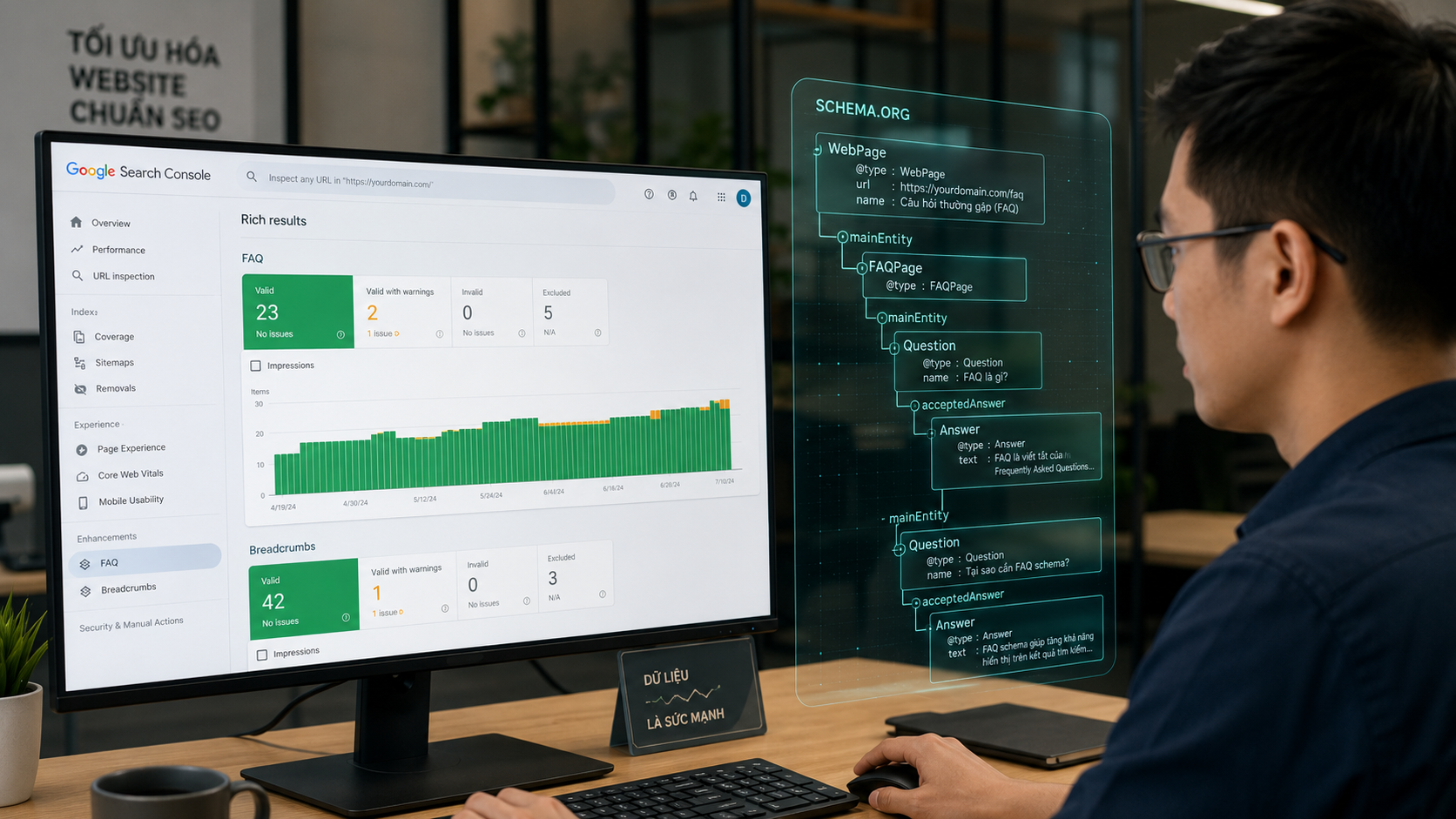
Áp dụng cho: trang có 3+ câu hỏi thường gặp + câu trả lời đầy đủ. Google hiển thị câu hỏi mở rộng trực tiếp trong SERP → chiếm nhiều estate.
JSON-LD mẫu: ```json { "@context": "https://schema.org", "@type": "FAQPage", "mainEntity": [ { "@type": "Question", "name": "Câu hỏi ở đây?", "acceptedAnswer": { "@type": "Answer", "text": "Câu trả lời chi tiết đầy đủ ở đây." } } ] } ```
Rules quan trọng (Google 2024+):
- Câu hỏi + trả lời phải hiển thị thực trên page (không ẩn hoàn toàn). Dùng <details> HTML OK, nhưng không display: none permanent.
- Không promotional content trong answer — không mention 'mua ở đây', 'đăng ký ngay'.
- 5-10 câu FAQ tốt nhất — quá ít Google không coi là FAQPage, quá nhiều dilute quality signal.
- Từ tháng 8/2023, FAQ rich result chỉ hiển thị cho government + health authority sites cho non-logged-in users. Logged-in user vẫn thấy.
Dù bị limit display, vẫn nên làm FAQ schema vì: 1. Voice search (Google Assistant, Siri) vẫn dùng FAQ schema để trả lời. 2. Google AI Overview (2024+) pull từ FAQ schema. 3. Microsoft Bing hiển thị FAQ rich result full. 4. Tương lai có thể mở lại display.
Trang single-question (diễn đàn, Q&A community) dùng QAPage thay FAQPage. Fields khác: mainEntity chỉ 1 Question, có acceptedAnswer + suggestedAnswer[]. Stack Overflow dùng QAPage.
3. BreadcrumbList — navigation cho SERP
Áp dụng cho: mọi trang có breadcrumb hierarchy (Home > Category > Article).
JSON-LD mẫu: ```json { "@context": "https://schema.org", "@type": "BreadcrumbList", "itemListElement": [ { "@type": "ListItem", "position": 1, "name": "Trang chủ", "item": "https://site.com" }, { "@type": "ListItem", "position": 2, "name": "Tin tức", "item": "https://site.com/tin-tuc" }, { "@type": "ListItem", "position": 3, "name": "Bài viết X", "item": "https://site.com/tin-tuc/bai-x" } ] } ```
Impact: thay URL dạng site.com/category/article trong SERP bằng breadcrumb dạng site.com > Category > Article. Đẹp hơn, professional hơn.
Best practice:
- Last item (page hiện tại) có thể skip URL hoặc dùng URL hiện tại — cả hai đều OK.
- position bắt đầu từ 1, increment.
- name không được > 30 ký tự (hiển thị bị cắt).
4. Organization — cho site identity
Áp dụng cho: homepage hoặc every page (trong <head>). Schema này giúp Google hiểu 'bạn là ai'.
JSON-LD mẫu: ```json { "@context": "https://schema.org", "@type": "Organization", "name": "Phần Mềm Tổng Hợp", "url": "https://phanmemtonghop.com", "logo": { "@type": "ImageObject", "url": "https://phanmemtonghop.com/logo512.png", "width": 512, "height": 512 }, "sameAs": [ "https://www.facebook.com/phanmemtonghop", "https://twitter.com/phanmemtonghop" ], "contactPoint": { "@type": "ContactPoint", "email": "[email protected]", "contactType": "customer support" } } ```
Impact: - Knowledge Panel — Google có thể hiển thị panel brand bên phải SERP khi search name. - Sitelinks — sub-link dưới main result. - Logo trong SERP — một số queries.
Bắt buộc cho brand VN:
- Submit tới Google Business Profile (nếu có địa chỉ offline).
- Link đầy đủ sameAs tới Facebook, LinkedIn, YouTube channels.
- Logo ≥ 112×112px, format PNG/JPG.
5. Product — cho e-commerce
Áp dụng cho: trang sản phẩm e-commerce.
JSON-LD mẫu: ```json { "@context": "https://schema.org", "@type": "Product", "name": "Tai nghe Sony WH-1000XM5", "image": "https://shop.com/product.jpg", "description": "Tai nghe chống ồn flagship...", "brand": { "@type": "Brand", "name": "Sony" }, "sku": "WH1000XM5", "offers": { "@type": "Offer", "url": "https://shop.com/product/sony-wh1000xm5", "priceCurrency": "VND", "price": "7990000", "availability": "https://schema.org/InStock", "priceValidUntil": "2026-12-31" }, "aggregateRating": { "@type": "AggregateRating", "ratingValue": "4.7", "reviewCount": "320" } } ```
Impact SERP: - Price + currency trong SERP. - Stars review (rating + count). - In-stock/out-of-stock badge. - Shopping tab eligibility.
Google Merchant Center: nếu site lớn (> 100 sản phẩm), submit feed tới Merchant Center để enable Shopping ads + free product listings. Kết hợp Product schema trên site làm tín hiệu verify.
2024 changes: Google strict hơn về aggregateRating — phải có review thật, visible trên page. Schema rating không khớp visible review sẽ bị penalty.
6. LocalBusiness — cho shop/văn phòng có địa chỉ
Áp dụng cho: nhà hàng, café, clinic, agency, shop VN có địa chỉ offline.
JSON-LD mẫu: ```json { "@context": "https://schema.org", "@type": "Restaurant", "name": "Phở Thìn 13 Lò Đúc", "image": "https://photo.jpg", "address": { "@type": "PostalAddress", "streetAddress": "13 Lò Đúc", "addressLocality": "Hai Bà Trưng", "addressRegion": "Hà Nội", "postalCode": "100000", "addressCountry": "VN" }, "telephone": "+84-24-3972-0186", "priceRange": "60,000-100,000 VND", "servesCuisine": "Vietnamese", "openingHoursSpecification": [ { "@type": "OpeningHoursSpecification", "dayOfWeek": ["Monday", "Tuesday", "Wednesday", "Thursday", "Friday", "Saturday", "Sunday"], "opens": "06:00", "closes": "14:00" } ], "geo": { "@type": "GeoCoordinates", "latitude": 21.009547, "longitude": 105.853539 } } ```
Subtypes theo ngành:
- Restaurant, CafeOrCoffeeShop, BarOrPub.
- Store, ClothingStore, JewelryStore.
- MedicalClinic, Dentist, Physiotherapy.
- ProfessionalService, LegalService, AccountingService.
Impact: Google Maps panel trong SERP, đặc biệt khi search name business + địa phương (VD: 'phở Thìn Hà Nội'). Click-through cao nhất trong nhóm rich result.
7. HowTo + Additional schemas
HowTo schema 2023-2024 bị Google limit hiển thị (chỉ showing cho limited queries). 2026 return một phần — đáng triển khai cho tutorial step-by-step.
JSON-LD mẫu: ```json { "@context": "https://schema.org", "@type": "HowTo", "name": "Cách cài Docker Desktop trên Mac", "step": [ { "@type": "HowToStep", "name": "Tải Docker Desktop", "text": "Truy cập docker.com và tải installer.", "url": "#step1" }, { "@type": "HowToStep", "name": "Cài đặt", "text": "Mở file .dmg, kéo vào Applications.", "url": "#step2" } ] } ```
Additional schemas đáng biết: - VideoObject: video embed, cho Google Video Search + key moments. - Recipe: cooking content, rich carousel với thời gian nấu + rating. - Event: concert, webinar, meetup — cho Google Events box. - JobPosting: listing tuyển dụng — cho Google for Jobs. - Course: khóa học online — Learnworlds, Coursera dùng. - SoftwareApplication: app + game — cho app discovery. - Review: review item bất kỳ với rating. - Dataset: research data, public dataset.
Validate + test schema — tool chuẩn 2026
1. Google Rich Results Test (https://search.google.com/test/rich-results): - Tool official Google. - Paste URL hoặc HTML. - Show rich result eligibility per schema. - Fast feedback (~5s).
2. Schema.org Validator (https://validator.schema.org): - Comprehensive validator (cover nhiều schema Google không show). - Good để verify JSON-LD syntax đúng.
3. Google Search Console → Enhancements: - Real-world data: schema Google đã crawl được trên site bạn. - Report errors + warnings. - Impression + click data per rich result type.
4. Chrome Extension: - Schema Builder by Schema App: view schema trên bất kỳ page. - SEO Meta in 1 Click: xem meta + schema tab.
5. SEO Toolkit: tool online browser-side cho VN — paste URL hoặc HTML, check schema đã có, suggest schema nên thêm. Miễn phí, không cần đăng ký.
- Không có dateModified — Google đánh giá content stale.
- Author là text 'Admin' thay vì Organization/Person object — Google strict 2023+.
- Image size nhỏ (< 1200×675) — rich result không hiển thị cho Article.
- JSON-LD trong client-side rendered (Script component) — bot không thấy. Dùng plain
<script type="application/ld+json">trong SSR HTML.
Xem thêm cách dùng AI viết tiêu đề SEO và Google SGE và AI Overview 2026 để hoàn thiện SEO strategy.
Câu hỏi thường gặp
JSON-LD hay Microdata / RDFa — nên dùng cái nào?
▾
Schema markup có thật sự tăng rank Google không?
▾
Có thể dùng nhiều schema trên 1 page không?
▾
<script> riêng, hoặc combine trong @graph array.Fake rating để trông đẹp có rủi ro gì?
▾
Schema cho trang tiếng Việt có khác gì tiếng Anh?
▾
@type, @context, property names) luôn tiếng Anh. Google hiểu cả tiếng Việt. Thêm inLanguage: 'vi' cho WebSite/Article schema để explicit.Bài viết dài có nên dùng Article hay BlogPosting?
▾
Next.js / WordPress / Shopify implement schema thế nào?
▾
<script type="application/ld+json"> trong component (không dùng <Script> component của Next.js vì render client-side, bot không thấy). WordPress: plugin Yoast SEO / Rank Math tự generate schema. Shopify: theme Dawn/Impulse có schema built-in, custom thêm qua theme.liquid file.Nguồn tham khảo chính thức

Lập trình viên độc lập tại Hà Nội. Tốt nghiệp ĐH Bách Khoa Hà Nội năm 2018, đạt giải nhì FPT Software Innovation Hackathon 2017. Đã ship 8 SaaS công cụ miễn phí (PDF, ImgTools, OneGen, SEOTool, KiTuDacBiet…) phục vụ người Việt từ năm 2018, với hơn 80 tool browser-side, không signup, tôn trọng quyền riêng tư.
Sau khi đọc xong, bạn có thể chuyển sang đúng công cụ liên quan để thử ngay trong bối cảnh thực tế.
Dùng SEO Toolkit